'never ever we're in such infinite abundance': my manifesto for vibe coding
We have never been in a time of such abundance. Today is 1st January 2026.
For decades, the barrier between “having an idea” and “holding that idea in your hand” was a wall of friction. You needed four years of computer science, or $50,000 for an agency, or a co-founder who spoke a language you didn’t.
That wall has crumbled.
“Vibe coding” isn’t just a TikTok trend. It is the democratization of creation. It is the ability to speak a vision into existence, treating code not as syntax, but as a conversation. But abundance can be paralyzing. When you can build anything, the hardest question becomes: what should I build?
I am still navigating this myself. I am fresh to the build, learning in real-time just like you. But here is the architecture I’m piecing together to make sense of this new world.
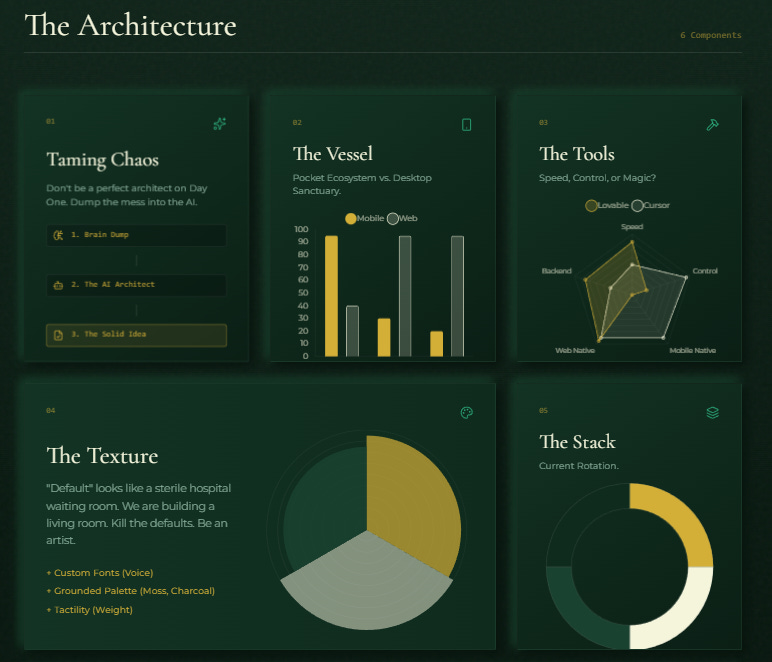
1 Start with the Chaos
The mistake I made early on (and still catch myself doing) is trying to be a perfect architect on Day One. I wanted a blueprint before I had even surveyed the land.
I’ve learned to resist that urge. Start with the mess.
Open your AI interface of choice (@ChatGPT app, @GeminiApp) and treat it like a tired but brilliant engineer sitting across the table from you. Dump every half-baked thought, every “what if,” and every feature idea into the chat.
I ask structural questions to force my own chaos into shape:
Which user persona currently struggles with what pain points, looks for which benefits?
Sketch me a user flow from login to logout.
What is the MVP feature list—and what can we cut?
How should the tech architect look like?
Iterate until the fuzzy cloud in your head turns into a solid paragraph you can actually use.
2 Choosing the Vessel
Once you have the idea, you need to decide where it lives. I’ve found this isn’t really a technical choice; it’s an environmental one.
The Pocket Ecosystem: Does your idea live in a teenager’s pocket while they wait for the bus? If the target is young or the utility is instant, a Mobile App usually wins.
The Desktop Sanctuary: Does it live on a second monitor while someone sips coffee at 9 AM? If it requires focus or complex data, a Web App is likely safer.
Don’t overthink this. The walls in vibe coding are thin. You can switch platforms later without tearing the whole house down.
The Builder’s Shortlist (What I’m using): For Heavy Lifting (but for everything i’m doing now): cursor_ai // antigravity interchangeably. This is for when I need to get my hands dirty with the code.
(haven’t got my hands on names like Lovable or Anything, so no comment here)
3 The Texture of the Thing (Design)
This has surprisingly become my favorite part of the build. There is a specific joy in the “making”—treating the screen like a canvas rather than a spreadsheet.
We are all artists here. The code is just the paint.
I love using @GeminiApp to push the boundaries of what feels “standard.” I spend hours just saying, “This looks nice, but what if we made it warmer? What if the shadows were deeper?” You don’t need to be a professional designer to have an eye for beauty. You just need the courage to experiment.
Color aesthetics: I play with palettes endlessly. If the default is that generic neon-purple, I swap it out. I use @coolors_co to find shades that feel grounded—burnt orange, moss, charcoal—and see how they change the mood of the room.
Tactility: This is about “feel.” I often remove the emojis because they feel cheap. I experiment with borders—swapping safe rounded corners for sharp, squared edges to give the buttons some weight.
1 hero tip: Love a specific website?, let Gemini try clone them, then add little bits of your personal flavors over and over till perfection.
4 When the Magic Breaks
Things will break. The screen will go red. The AI will hallucinate.
Do not panic. This is the friction of creation.
When an error appears, it’s tempting to just say “fix this.” But I’ve found that treating the error log like a confession works better. Read the red text. Paste it into the chat. Ask the AI: “Why did this break? Explain the logic failure.”
The goal isn’t just to patch the hole; it’s to understand the plumbing so we don’t break it next time. And this is the part where you ‘learn the most technical-wise’ while playing around vibecoding.
5 Protecting the House
If you have users, you have a responsibility. This part still makes me nervous, but here are the safeguards I use:
The Lock: Enable Row Level Security (RLS). It sounds technical, but it’s simple: it ensures strangers can’t read each other’s diaries. I always ask the tool to guide me through it step-by-step.
The Time Machine: Always sync your project to @github. I’ve broken things catastrophically before, and GitHub let me rewind time to yesterday from its ‘version controls’. It is the ultimate safety net.
6 The Vibe Stack (My Current Rotation)
Tools are just brushes, and I’m still testing which ones fit my hand best. Here is what is working for me right now:
The Brains: @AnthropicAI (Claude Code) for tech architecting from scratch, organizing, reasoning, and thinking with me (oh i love Sonnet, then i love his brother Opus too; so you may guess how crazy I’m about him (them))
The Plumbing: @supabase for databases (where the memories live).
The Aesthetics: just one king Gemini @NanoBanana for assets
The Backstage: @Render. Connect it to GitHub, and it auto-deploys every time you save. It feels like magic.
FINAL NOTE: FIND YOUR TRIBE
Creation is a lonely act, but it doesn’t have to be. I scour X and Reddit (/r/vibecoding) for hackathons, not to win, but to force myself to ship.
You don’t need expert-level knowledge to start. I definitely don’t have it yet. You just need to be curious enough to test what you build.
We are living in an age of infinite tools. Let’s go make something weird.